A TXT record is a type of DNS record that holds human or machine-readable text information about a domain, primarily used to verify domain ownership or implement email authentication protocols like SPF, DKIM, and DMARC.
You can add a TXT Record using the cPanel's Zone Editor option.
1. Log in to your cPanel account.
2. In the Domains section, click on Zone Editor.

3. Under Domains, you can see many options below Actions.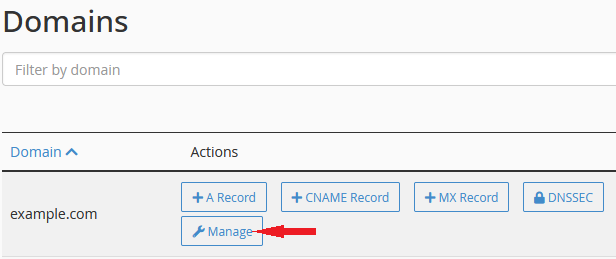
4. Click on Manage to open a full list of the domain's DNS records
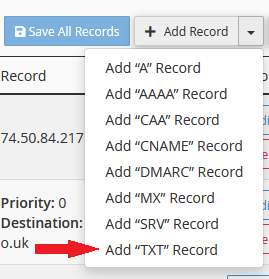
5. Select the downward arrow next to Add Record and select the Add "TXT" Record option.
6. Please enter the required details.
Name: This is usually the domain that you want to set up the TXT record against. If you are setting up a record from a 3rd party system, then use the name they suggest.
TTL: This is the Time to Live value in seconds for a server to cache this DNS record. The recommended setting is around 3600 (1 hour) for TXT records.
Type: This is the type of record that you wish to set up. Leave the default value of TXT.
Record: This is value of the DNS record, which can vary drastically depending on what type of TXT record you're trying to create. The below example is for an SPF record.

7. Now, click on Save Record.
If the record is added successfully, you will see a success message.
Note: It may take anywhere from 12 to 24 hours for the changes to take effect worldwide.
